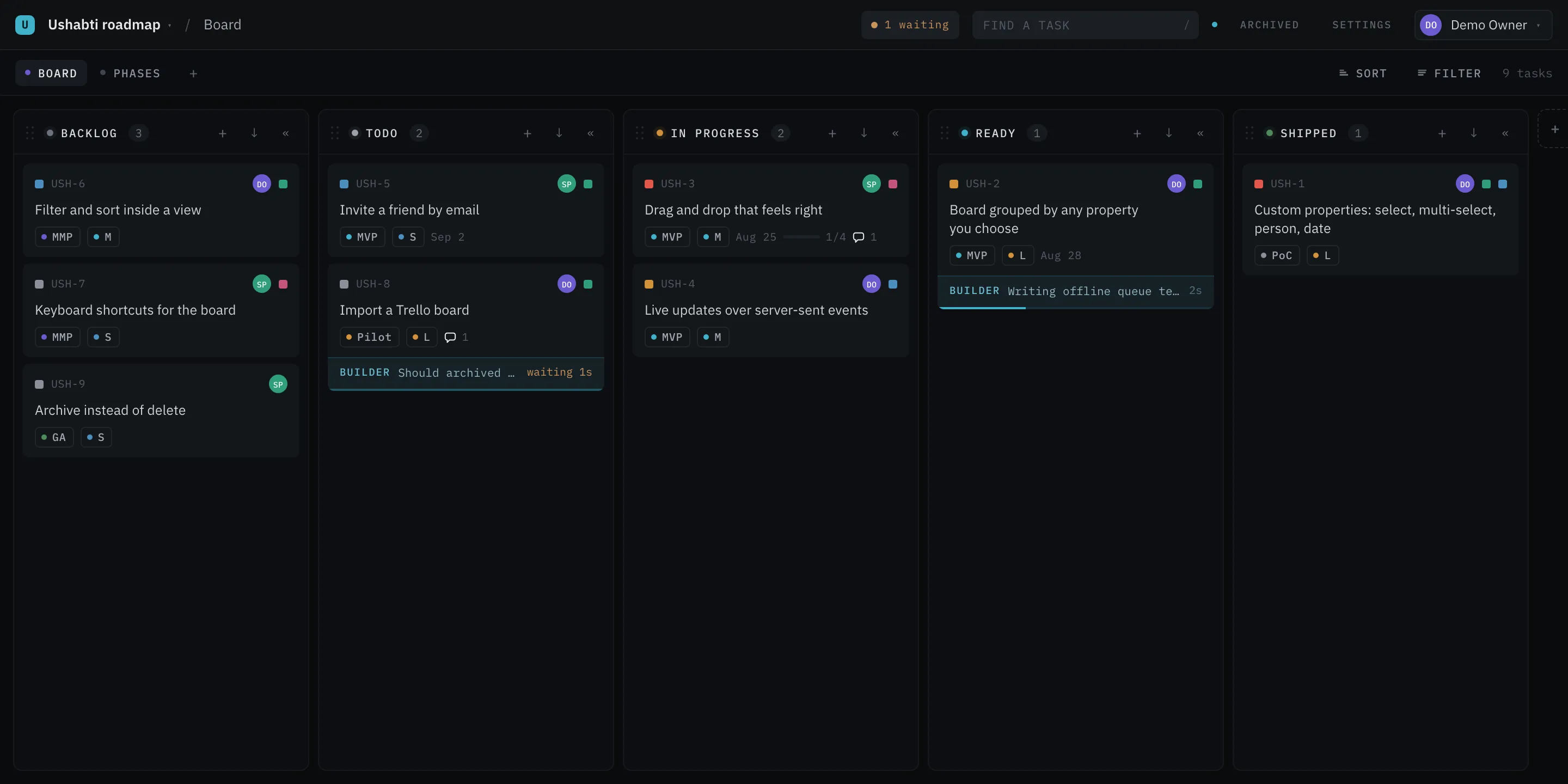
Drag it. Cards move inside a column and between columns; dropping one on the free space below a
column’s cards sends it to the end of that column. A drag has to travel five pixels before it counts,
so a click still opens the card.
Moving a card to another column writes the grouping property’s value for that column. Dragging
a card from Todo to In Progress is not a special board operation; it sets Status = In Progress.
That is the same write the panel makes, and the same one an agent makes over the API.
Each column header carries a six-dot grip. Drag it and you reorder the options of the grouping
property — for everybody, and in every view that groups by it. Three conditions:
Only when the grouping property is a select. Person and checkbox columns have no order to
change.
The No status column never moves; it is always last.
Not while a filter names the grouping property. A drop can only say which column it landed
after, and through a partial view you would be ranking an option after a column somebody else
cannot see.
Each column header carries a « beside its +. Press it and the column folds to a narrow
strip that still shows its name and how many cards are in it. Press the strip and it opens again.
A fold is yours alone. It is kept in your browser, per view and per column, so it survives a
reload and reaches nobody else’s board. Nothing about it is written to the project, and an agent
reading the API sees a board that never folded.
A folded column is still a drop target: drag a card onto the strip and it lands at the end of
that column, exactly as dropping it on the free space below the cards would. Nothing can be lost on
a strip.
The arrow keys step over a folded column the way they step over an empty one, because it draws no
cards to land on — see Keyboard. A folded column cannot be dragged to a
new place; open it first. Its order belongs to the option everybody shares, while the fold belongs
to your browser.
Each column header carries ↓ beside its +. It asks in the header itself, in real numbers:
Archive 42 tasks in Done? They leave the board and keep their history.
Yes, archive takes every card in that column off every board and every list, and a toast says
how many went — the server’s count, not the one the question named a moment earlier. Nothing is
deleted: each task keeps its values, its checklist, its comments, its history and its link, and any
one of them can be put back from its own panel — see
the task panel.
This is the answer to a Done column that grows without limit. What went is on
the archive page.
A person only. One press can clear forty cards, so an agent cannot make this call. An agent
may archive the one task it finished.
Not while a filter is on. The button is absent then. The sweep names a value of the grouping
property, so under a rule it would archive tasks this board is not drawing — and the count in the
question would not be the count that went. Clear the filter and the button is back.
Archived in the top bar, beside Settings, opens /p/{project}/archived: every archived task
of the project, newest first, with the key, the title and when it went. It is not a view — no view
draws an archived task — which is why it is a page of its own and not a pill in the view strip.
The key and the title open the task, exactly as its link does.
Put back returns one to the rank it never lost, so it lands where it was. The row goes, and a
line says which task is back.
The box at the top narrows the list by key and title, which are what a row shows.
The page draws the archived tasks your browser already carries, so it answers as you type and asks
the server nothing until you put one back. Who archived a task is not on the row: open it and the
activity log says who and when.
Below the archived list, the same page holds the other kind of gone: Deleted, gone in 30 days,
drawn only when there is something in it.
A deleted task is off every board and every list, out of every search and every count. It is not
half gone: its link opens nothing, and anything that asks the API about it is told there is no such
task. For thirty days it is still here, and Put back on its row returns it whole — with the key
it had, the rank it had, and its values, its checklist, its comments and its history. A task you
deleted while it was archived comes back archived.
The delete itself says so, in one line at the bottom of the board: USH-14 deleted. It stays under
Archived for 30 days. Beside it is Undo, which puts the task back at once, in the
column and the place it left. The line stays ten seconds, and longer while the pointer or the focus
is on it. It does not take the focus from the board: press Tab to reach Undo, then
Enter. After the line goes, Archived in the top bar beside Settings is the way
back.
Newest first, with when it went and how many days are left.
The key and the title open nothing, unlike an archived row. There is nothing to open until it
is back.
Put back asks nothing first. It takes nothing away, so there is no cost to name.
After the thirty days the task is taken away for good, and everything on it goes too. The window is
the same for every project and it is not a setting.
+ New column at the right end, shown only when the grouping property is a select. Type a name,
press Enter. It adds an option to the grouping property, so the column appears on everybody’s board.
If the current view has an is rule on the grouping property, the new option joins that rule —
because nobody makes a column in order not to see it.
The cards in a column are in position order, top to bottom — the one order every view in the
project shares — until you ask for another one.
Press Sort in the view strip. A board has no headings to press, so the order is asked for beside
Filter. The panel lists everything a card carries: press a row for one way, press it again
for the other, and a third time for the order the board itself keeps. Every column is
drawn in that order, and a chip above the board names it so you can see at a glance that the board
is not in its own order. The row and the chip name the way by what the column holds — A→Z for a
title, Earliest first for a date, Option order for a select — with the same words a list
heading uses. The ✕ on the chip is the other way back. If the view has an order of its
own, the third press goes back to that order, and a press on that column turns it around.
It is the same order a list gets from its headings, decided by the same rules — which column kinds
order which way, and why a task that holds nothing goes last, are in
The list. The order is yours, the way a filter
you add is: it is remembered for you on that view, it follows you to another browser, and nobody
else’s board moves. The chip says Only you see this, and Save for everyone puts your order on
the view together with your filters. A view can carry an order for everybody too; yours wins on your
screen while you have one, and its chip’s ✕ asks Remove for everyone? first.
A sort writes nothing. The rank each task carries is untouched. A task you add while an order
is on lands where the order puts it, not at the top or the end you pressed.
The + in a column header — adds to the top of that column.
The empty area below the cards — adds to the end. It reads Add a task when the column is
empty.
Both open a composer with the placeholder “What needs doing?”. Enter adds it (Shift+Enter is a
newline), Escape cancels, and clicking away with text in the box also adds it. The box grows
with the title, so a long one shows in full before you add it. The new task’s panel opens straight
away.
Under the box is a line saying what will happen: Enter to add · Esc to cancel, or
Enter to add · sets Priority Urgent when a filter is going to fill something in. The composer says
what it will write before it writes it — see Filters.
A task can say which tasks it waits on. Open the task, press ⋯ and choose Blocked by…, then
type the key or the title of the task that blocks it. Blocks is the other end of the same
chain, and each list adds the same way, by the + beside its heading.
A row is a key, a title and a ✕. The ✕ asks nothing: unlinking costs one key to undo, and the
question is for what cannot be undone.
The card says one thing about it: a small grey chain beside the key, with the blockers in its
tooltip. Never a list and never a count — a board where half the cards are waiting has to stay
readable, and the panel is where the chain lives. It is drawn rather than typed, so it is the same
shade and the same shape whatever fonts a machine has.
A blocker stops blocking when it is over. Over means archived, and it also means the one option
the owner named under Done when in Settings → Project.
Archive the blocker and the chain glyph goes by itself; the link is still there, struck through in
the panel, because it happened.
A circle is refused with one sentence — USH-12 already waits on USH-71, so this would be a circle.
— and so is a task told to wait on itself. Nothing is written when either is refused.
A task with no links draws nothing at all in the panel. That is why the way in is the menu: a
heading over an empty list, on every task in the project, would cost more than the line it saved.
A task can be part of another one, one level deep. Open the task, press ⋯ and choose
Part of… to give it a Parent, or Add a part… to give it a child. The panel then shows a
Parent row with the one task it is part of, and a Children list with its parts, in board
order. Each adds by the + beside its heading and comes off by its ✕, as the chain does.
One level means a part has no parts of its own. Make a part the parent of another task, or give a
parent a parent, and the panel refuses it with one sentence that names the two tasks.
A parent says how many of its children are done. The panel heading reads Children · 3 of 5
done, and the card and the list row draw 3/5, as a bar or as a count. Done means the same as
for a blocker: archived, or holding the option under Done when. A deleted child is not counted.
The count changes at the next board read, so a child moved to Done changes its parent’s card
without a reload. A task with no children draws nothing.
The count is a row of the card view, called Children. It sits in the footer at first; move it,
read it as a count, or take it off in the card view, as the checklist.
Moving ten cards to a new owner one at a time is the tenth-time friction a team notices most. So a
card can be selected, and one answer goes on all of them.
There is no mode to turn on. Hover a card and a check appears in its top-left corner; press it and
the card is selected. Once anything is selected, every card shows its check, so the way out is where
the way in was.
How
What it selects
The check in the corner
That card, or deselects it.
Shift + click a card
Every card from the last one you selected to this one, inside one column. In another column it selects that one card and starts again from it.
x
The card the cursor is on, or deselects it. It is the whole keyboard route in, because the board keeps one tab stop.
A plain click still opens the task, and Space still lifts a card for a drag. A selected
card wears a border and nothing more: a board with ten selected cards on it has to stay readable.
While anything is selected, a small bar stands in the top bar beside the search box:
3 selected · Set… · Archive · ✕
Set… asks the same two questions the filter asks, in the same panel: which property, then what
about it. The answer goes on every selected card in one write, so the board never ends up half set. The
selection stands afterwards, because setting a second property on the same cards is the next thing anybody
does.
Archive takes the cards off the board. It asks first, and the bar itself is the question —
Archive 3 tasks? — because the board has no dialogs. The cards keep everything they had and are on
the archive page, one press from coming back. Unlike Set…, it ends the
selection: the cards are gone, so there is nothing left to count.
✕ (Clear selection) or Escape ends it, and so does moving to another view. With the question standing,
Escape takes the question away first and leaves the selection.
On a phone the bar takes the room it needs: the project name goes, and below 560 px so do the search
box and the two links off the board. The question is longer than the count, so while it stands the
project mark goes too. Everything comes back the moment nothing is selected.
Below 560 px the board draws one column, the width of the screen, and stops scrolling
sideways. Two 272 px columns need 576 px, so below that a second one cannot honestly be drawn.
Above 560 px nothing changes at all.
Over the column is a strip of column pills: a dot, the name, and how many cards are in it, with
the column on screen filled. It sits below the filter chips and above the board, and it is not a
second view strip — it names columns rather than views, it carries no sort and no filter, and its
pills never drag, because the column order belongs to the property everybody shares. + New
column is the last pill.
Three ways reach another column, and all three move the same one thing:
How
What it does
A pill
Shows that column.
A swipe
60 px sideways, and further sideways than up or down. A finger going left brings in the next column; going right, the one before. A finger going up or down scrolls the column, as it always did.
←→
The same keys the board has everywhere else. The cursor walks to a card in the next column that has one, and the board follows it there — see Keyboard.
A board opens on the first column every time. Which column you were on is not remembered: it
would be a second hidden state, and the strip above says where you are in one glance.
What is different down here, and why:
No drag. There is one column on screen, so a card has nowhere to be carried. To move a card,
open it and set the grouping property in the panel — that is the one value a drop across a board
writes. Set… in the selection bar does several at once. With the drag
sensors off, a finger going sideways belongs to the board.
No column drag, for the same reason, and no folding: a fold gives width back, and there is
no width here to give. A fold you made on a wider window is ignored rather than cleared, so the
wider window gets it back.
The check that selects a card is always drawn, on a card and on a list row, because a finger
cannot hover.
A list changes nothing on a phone: it is one column of rows already, so it
has no strip, and a row keeps its columns.
Press it for your projects, this one marked ✓, then your own lists, then New project and
Home. It is
the one way to another project, and it is the same on the board, in Settings and in the
Archive. The arrow keys walk it, Enter opens the highlighted row and Escape
puts it away. Past eight projects a box above the list narrows it. On a phone the name is hidden
and the letter beside it is the button.
N waiting
Shown only while an agent waits for a person: 2 waiting means two tasks where an agent asked a
question and stopped. It counts the whole project, so no filter, lens, folded column or list
hides a question. Press it for the list, the oldest ask first — the key, the title, the agent,
the first line of the question and how long it has waited. A row this view does not draw says
not in this view, as a search does. Pick a row and the task opens with the cursor in the
answer box. The row goes when the agent goes back to work. The browser tab says (2) in front
of its title, so a tab in the background shows it too.
The live dot
On: “Live: changes from others arrive by themselves.” Off: “Not live right now.” It is the
state of one server-sent-events connection per tab.
The listening agents
A ◆ for every agent that holds the board’s stream open, which is an agent that hears a new
task at once. An agent that is away draws nothing. Every agent draws the same ◆, so point at
one, reach it with Tab, or tap it on a phone, and its name shows under it at once.
Archive and Settings
The two pages of a project that are not the board. Archive lists what has been archived;
Settings holds the properties, the card, the views, the people and the project itself.
The view strip
Every view, the + to add one, the Sort and Filter pills, and a count. Drag a pill to
change where a view sits, for everybody. The count reads 40 tasks, or 12 of 40 tasks when
filtered, so a board can never quietly be a part of itself. Sort is on a board only: a list
has headings to press instead.
Two different empty states, because they mean two different things.
No task passes the filter — with a Clear the filter button. Your work is there; you asked a
question it does not answer.
Nothing at all yet — and the board takes the chance to explain itself:
The columns come from a property called Status. So do Priority, Assignee and the rest — every
field on a task is yours to rename or delete in Settings.
Somebody else moves a card, edits a title, adds a column, renames a property or changes a filter,
and your board follows in about a second with no reload.
The mechanics, in case a number matters to you: one EventSource per tab, fed by Postgres
LISTEN/NOTIFY, so any Ushabti process on the same database sees every write. Incoming events are
debounced by 140 ms and then the board is refetched. The event says what changed, never how —
there is no payload to get out of order. Your own writes are tagged and skipped, so your tab never
refetches because of you.
The board also re-syncs whenever the stream connects — first open, and after every reconnect. Events
have no replay, so anything broadcast while you were reconnecting would otherwise be lost for good.
KeyboardOne press of Tab reaches the board. Everything after that is arrows.